Book a Call with Faraz The Web Guy
If you’re looking to:
👉 Grow on Upwork
👉 Build a strong personal brand
👉 Enhance your web development skills
👉 Or simply navigate career decisions


 Stop wasting Connects on jobs you were never going to win anyway.
Connects are getting expensive, and people are boosting proposals more than ever. But even with all that, a large number of jobs still close without any hires.
Most freelancers are applying blindly, without knowing whether their profile even aligns with the job. So even if the proposal is good, it often never gets seen.
Instead of applying everywhere, the idea is simple: apply only where you actually have a realistic chance of getting noticed.
Not based on gut feeling, but based on how closely your profile matches the job itself.
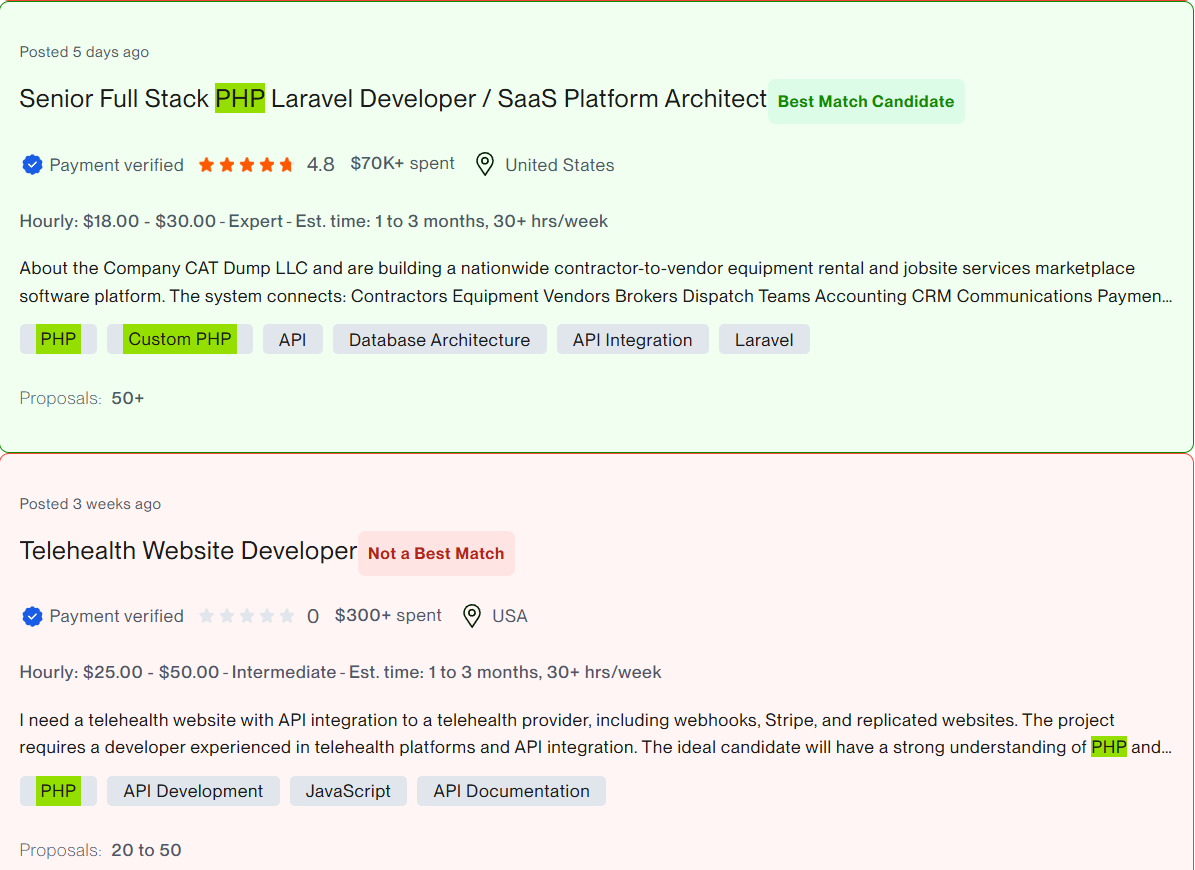
It scans jobs in real time and compares them with your profile data to help you identify which ones are actually worth applying to and possibly receive the Best Match badge.
1. Reads your profile
When installed, it asks you to input your profile data.
2. Scans jobs on the page
Every time you browse jobs, it reads each job title and its associated skills.
3. Matches your profile with the job
It runs three simple checks:
4. Highlights relevant jobs
When all conditions are met, the job is visually marked so you can instantly identify it as a strong match.
Step 1: Download the Extension
Step 2: Open the ZIP File
Step 3: Add the Extension to Chrome
Once installed, you will see the “Upwork Job Matcher” icon in your browser. Click on it to add your profile data. Then go to the Upwork job search page (https://www.upwork.com/nx/search/jobs) to see the magic.
If you’re looking to:
👉 Grow on Upwork
👉 Build a strong personal brand
👉 Enhance your web development skills
👉 Or simply navigate career decisions